
























Data Center Power Distribution and Monitoring 101
Data center power distribution delivers electricity from the facility's power source to the IT equipment that consumes it. Data center monitoring provides visibility into how much power is being used, where it is being used, and how much capacity remains available to improve uptime and efficiency.
How power works in a data center
Power in a data center might be bought from a local utility company or the data center might generate its own power (via on-site generators). Power makes its way through a data center via equipment such as switchgear and transformers and is then distributed by PDUs (Power Distribution Units), remote power panels (RPPs), and busways to other devices in the data center, including servers, uninterruptible power supplies, power/data panels, and cabinets/racks. The series of hops from the power source to the devices in the data center is called a power chain.
While AC power is found more frequently in data centers than DC power, more facilities are becoming direct current data centers.
How data center power monitoring works
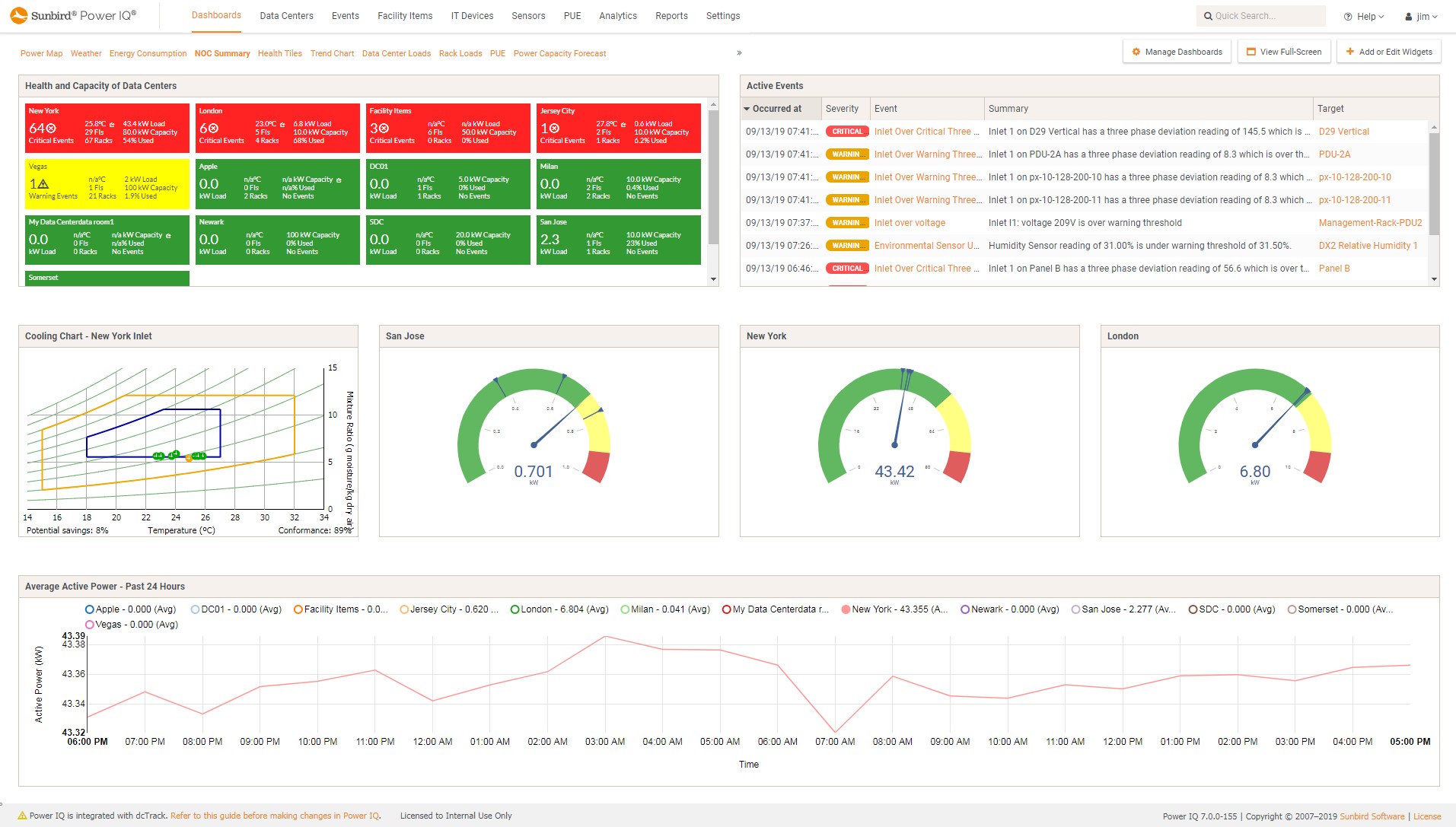
Most monitoring starts with meters such as those in intelligent rack PDUs that measure power and report it over the network. Data Center Infrastructure Management (DCIM) software polls these devices at regular intervals, stores the readings, and compares them against thresholds. When a value crosses a threshold, the software raises an alert so staff can respond before a problem becomes an outage.
Historical data matters as much as measured data. Trends show how load grows over time, when peaks occur, and how much capacity remains.
What to power data can be monitored
Before you can manage power, you need to know what matters. At the rack level, key information includes:
- Current (amps). Tracks load against circuit breaker limits so you can act before a breaker trips. In three-phase power systems, watch the load on each phase, because an unbalanced load shortens equipment life.
- Voltage (volts). Shows whether supply stays within acceptable limits. Over- or under-voltage can damage sensitive equipment.
- Active power (watts/kW). The real power your equipment is consuming. This is the number to use for capacity planning, in place of nameplate ratings.
- Apparent power (kVA). The total power delivered to the rack, including reactive power. It reflects overall demand and power quality.
- Energy consumption (kWh). Cumulative usage over time. It reveals trends and peak periods, and it's the basis for cost allocation and future planning.
What you can gain with data center power monitoring
Data center power monitoring with DCIM software supports:
- Better uptime. Set warning and critical thresholds for rack, inlet, and breaker loads and for three-phase balance, so you can fix an overloaded circuit before it causes downtime. Failover simulations show which cabinets would fall outside your redundancy requirements if a power circuit failed, so you can rebalance their loads in advance. Health polling checks at set intervals that each PDU is reachable and alerts you automatically if one isn't.
- Higher energy efficiency. Bill back reports show customers or business units what they consume, which encourages more efficient behavior. A built-in ghost server report lists potential ghost servers, meaning servers that are powered on but drawing very little load. Investigating them and decommissioning those that aren't needed reduces energy waste. DCIM software can also automatically calculate and trend energy KPIs like PUE across your sites, so you can see how your efficiency efforts change them over time.
- More informed capacity planning. Stranded capacity reporting, through dashboards and color-coded 3D floor maps, shows where capacity is available. What-if analysis lets you preview how a planned deployment affects rack power capacity before you commit, and built-in power circuit intelligence gives you capacity and usage data at every hop of the circuit.
- Lower costs. Monitoring helps you cut energy waste, defer capital expenditures by reclaiming stranded capacity, and validate colocation power charges against actual usage. Balanced phases also improve distribution efficiency and extend equipment life.
Real-world case studies of data center power monitoring with DCIM
As illustrated by these case studies, DCIM software can help data center managers maintain consistent operations and avoid costly downtime:
- For Exponential-e’s full-service CloudNet platform, DCIM software helped their data center managers keep accurate track of power usage and capacity with access to real-time energy information to help meet SLAs and plan for future power needs.
- Comcast used Sunbird DCIM’s Auto Power Budget feature to automatically calculate highly accurate power budget numbers for each server instance. As a result, Comcast increased the utilization of their existing facilities by 40%.
Want to see how Sunbird’s data center monitoring solution can help you improve uptime and efficiency? Get your free test drive now.